 |
| Octave 4.0.0 on Ubuntu 14.04 Trusty with GUI as default |

Showing posts with label Octave/Matlab. Show all posts
Showing posts with label Octave/Matlab. Show all posts
Thursday, October 08, 2015
Installing Octave 4.0 in Ubuntu 14.04
So I already have Octave 3.8.1 in my machine, Ubuntu 14.04, with signal, control and audio package. I want to upgrade it to the newest one, Octave 4.0.0 which has GUI as default and some improvements. How to install Octave 4.0 on Trusty? Here is how, the defaults didn't works for me (actually it works but has some errors).

Thursday, September 24, 2015
Computation at VibrasticLab
The following slide I made for smr2761: Workshop on Computational Science Infrastructure and Applications for Academic Development, or simply as HPC workshop (high performance computing) in Trieste, 28 September ~ 9 October 2015. At the first day, we are required to introduce our selves, explain the current computing facilities, the future plan for development and our expectation from the workshop. This is my slide from VibrasticLab.
Monday, December 29, 2014
Matlab in Terminal: Nodesktop Vs Nojvm
There are two choices to use Matlab in terminal or console (under Unix and Linux-based OS), with option -nodesktop or -nojvm. The following two pictures are the similar of Matlab running in terminal with those different options/arguments.
 |
| Matlab with nodesktop |
 |
| Matlab with nojvm |
What's the difference?
Thursday, August 28, 2014
Memakai Matlab atau GNU Octave?
Ada banyak halaman yang membahas perbedaan antara Matlab dan GNU/Octave. Perbedaan secara teknis bisa dilihat di halaman Wikibooks: MATLAB Programming/Differences between Octave and MATLAB, perbedaan dari sisi desain (compiler, core, dll) bisa dilihat di FAQ octave, dan perbedaan secara sintaks bisa dilihat disini. Lalu, mana yang dipilih, Matlab atau Octave?
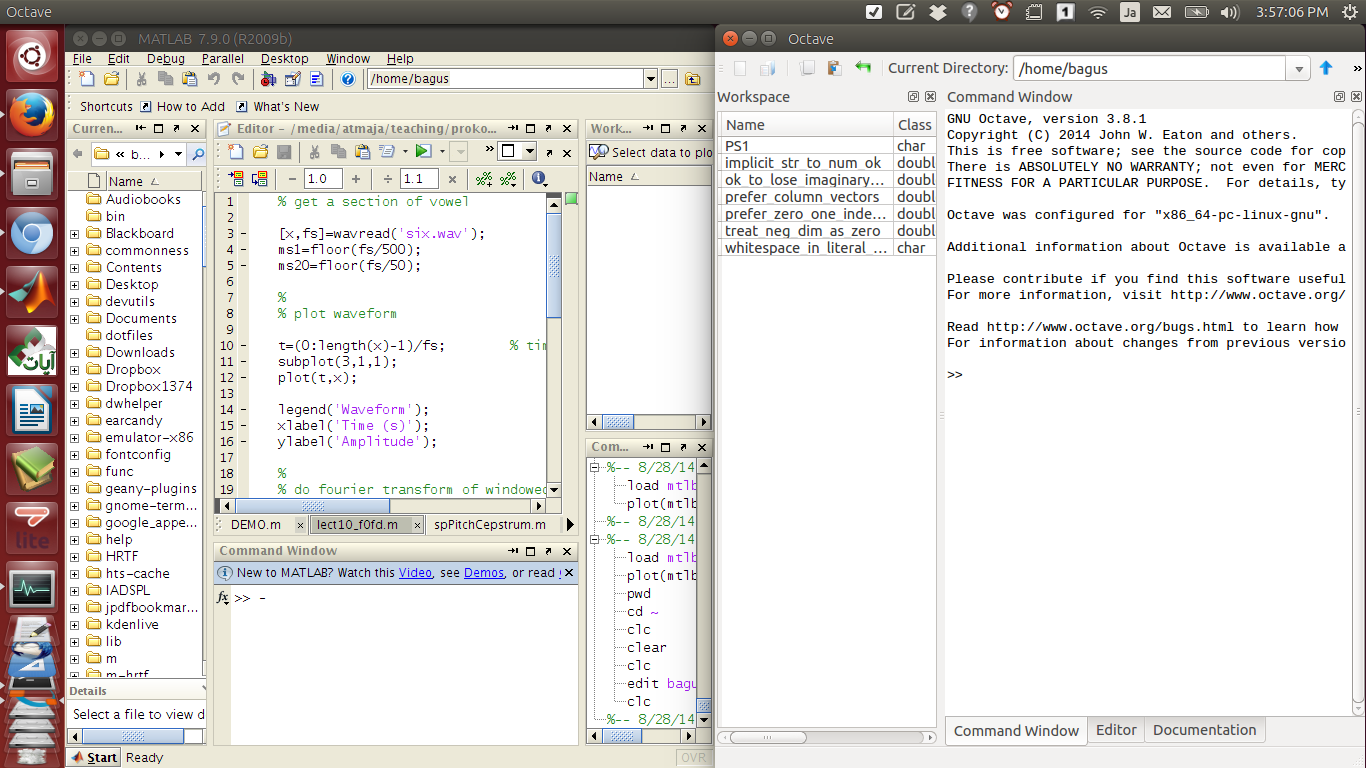 |
| Matlab (kiri) dan GNU Octave (kanan) dalam satu workspace |
Sunday, March 30, 2014
Memfilter Sinyal Suara Pada Range Frekuensi Tertentu (Bandpass) dengan Matlab / Octave + Python
Buka - buka file lama di folder kuliah S1 Teknik Fisika, saya menemukan file script matlab yang saat itu dimintai tolong seorang teman untuk mengerjakan Tugas Akhirnya. Script ini untuk memfilter sinyal (suara) pada frekuensi tertentu dengan menggunakan bandpass filter, yakni gabungan antara low pass filter dan high-pass filter.
Misalnya kita mempunyai sinyal suara dengan frekuensi 0 - 20000 Hz, namun karena suatu hal (misalnya noise) kita cuma butuh sinyal di frekuensi 700 - 1400 Hz saja, maka kita bisa menggunakan script matlab / octave ini. Script ini berjalan lancar baik pada Matlab maupun GNU Octave.
Gambar spectrogram di bawah ini membandingkan spectrogram sinyal sebelum difilter dan setelah difilter. Script untuk GNU / Octave ada di bawahnya.
Berikut script kode Octave / Matlab (link Github disini).
Misalnya kita mempunyai sinyal suara dengan frekuensi 0 - 20000 Hz, namun karena suatu hal (misalnya noise) kita cuma butuh sinyal di frekuensi 700 - 1400 Hz saja, maka kita bisa menggunakan script matlab / octave ini. Script ini berjalan lancar baik pada Matlab maupun GNU Octave.
Gambar spectrogram di bawah ini membandingkan spectrogram sinyal sebelum difilter dan setelah difilter. Script untuk GNU / Octave ada di bawahnya.
|
|


Berikut script kode Octave / Matlab (link Github disini).
% demo program untuk memfilter suara pada range fekuensi oktaf tertentu
% by bagustris bagustris@linuxmail.org
% adopted from somewhere (forget aka lupa)

% set general variables
clear all; close all; clc;
sf = 22050;  % sample frequency
nf = sf / 2; % nyquist frequency
d = 1.0;     % duration, ganti untuk merubah durasi suara
n = sf * d;  % number of samples
nh = n / 2;  % half number of samples
Friday, January 13, 2012
Image Compression in GNU Octave and Matlab
Suppose you have an image file namely "image.jpg". Due to the file size, you want to compress it to smaller size. In GNU Octave and Matlab, the following simple commands can be used,
image=imread('image.jpg');

imwrite(image,'image_new.jpg','quality',50);
Those commands will compress "image.jpg" to "image_new.jpg" with the quality of compressed image is 50% of the original image.Please note, the current supported image format. when I wrote this article, is .jpg only.Monday, November 14, 2011
Find Local Peak of Signal in GNU Octave
The finding or searching the local peak is needed for some application such as fundamental frequency estimation, finding time delay or timelag or others. The following is a simple program to find the local peak of signal. The example of .wav sound signal
To give the display and find the rough peak of signal you can see from the figures of signal. The picture below comparing whole signal and the local signal from 1 to 4000 samples. To find the coordinate of local peak, just simply type
[a b]=max(signal(1:4000)
octave:1> [signal, fs] =wavread('signal.wav');    % read signal

octave:2> threshold=0.1;                          % limit the min. peak amplitude

octave for sig_ind = 1:4000
> if signal(sig_ind) > threshold
> x=sig_ind;
> break;
> endif
> endfor
octave:3> x
x = 3822
To give the display and find the rough peak of signal you can see from the figures of signal. The picture below comparing whole signal and the local signal from 1 to 4000 samples. To find the coordinate of local peak, just simply type
[a b]=max(signal(1:4000)
 |
| Full length signal and signal from 1 to 4000 samples |
Monday, November 07, 2011
Play Sound/Audio File such as .wav in GNU / Octave
In octave, there is not function like wavplay or sound such in Matlab. Octave has own function to play audiofile i.e playaudio, but it is never work for me. Instead of repair the playaudio function in Octave, below is simple script function to play sound file in Octave.
Please copy the code below and paste to your PC (work on Ubuntu Linux) as playsound.m
%%%%%%%%%%%%%%%%%%%%%%%%%%%%%%%%%%%%%%%%%%%%
% This function play the singal x as a sound.
% playsound(x, fs, bits)
%  x : a signal vector
%  fs: sampling frequency in Hz
%  bits: quantization bits
%
% If encounter a error, try to transpose a signal vector,
% like playsound(x',fs,bits)

function playsound(x,fs,bits)
if (nargin != 3)
  usage("playsound(x,fs,bits)");
endif

 file= strcat(tmpnam(),".wav");
 wavwrite(file,x,fs,bits);
 system(sprintf("/usr/bin/paplay %s ; rm -f %s",file,file));
endfunction
%%%%%%%%%%%%%%%%%%%%%%%%%%%%%%%%%%%%%%%%%%%%%
Calculate Time Lag from Cross-correlation in Octave - Matlab
Calculation of time lag or time delay between two identical signal is very important in many areas, especially in system identification. By knowing time delay or time lag, we can analysis the signal such as subtract the output signal length according to the time lag. This problem usually appears in signal processing, control system, process, acoustic (determine time lag between sound sources and microphone) or other systems with input and output data.
In the other side, cross-corelation is useful tools. Using cross-correlation we can find the strongest point of correlation between two signal, and then shift the signal according to distance of strongest point to zero position. But the problem is the x-axis in cross-correlation not the time or sampled time (length), it is index. Let's solve by bringing the problem to computation methods such as GNU/Octave or Matlab.
Suppose, we have two signal in case of signal enhancement process. The first signal is true target signal, and the second is enhanced signal. We want to know, the time lag between true target signal and enhanced signal. The time lag can be resulted because of algorithm processing and others.
First, we read sound data in Octave or Matlab. We type,
And then, calculate the cross-correlation between signal and enhanced signal using the following command,
Suppose, we have two signal in case of signal enhancement process. The first signal is true target signal, and the second is enhanced signal. We want to know, the time lag between true target signal and enhanced signal. The time lag can be resulted because of algorithm processing and others.
First, we read sound data in Octave or Matlab. We type,
[signal, fs]=wavread('signal.wav');

[enhance,fs]=wavread('enhance.wav');
And then, calculate the cross-correlation between signal and enhanced signal using the following command,
Tuesday, October 18, 2011
Generating White Noise Sound on Octave / Matlab
The following white noise sound was generated with GNU Octave's random number generator rand(), which generates uniformly distributed random values in the interval [0,1). The wavwrite() function expects values in [-1.0, 1.0), so we multiply by 2 and shift down by 1. So to generate 10 seconds of noise sampled at 48 kHz:
white=rand(48000*10,1)*2-1;
I'm not sure about the inner workings of /dev/urandom, but I used the "reseed" command to feed it data from random.org, so this should be pretty random. To export this to a 16-bit, 48 kHz .wav file in our home directory, the command is:
When the Eigenvectors of Matrix Always Orthogonal or Not (With Octave/Matlab Prove)
In Linear Algebra, an orthogonal matrix is defined as matrix with its transpose equal to its inverse,
$$ Q^T = Q^{-1}$$ or
$$ Q.Q^T = Q^T.Q = I $$ How about eigenvectors of Matrix? Are eigenvectors always orthogonal? The short answer is no. Eigenvectors of an arbitrary (but not degenerate) square real matrix A are sure to be independent (if there are no repeated eigenvalues), however they are not necessarily orthogonal.
Are eigenvectors of a symmetric matrix always orthogonal? The short answer is yes. Gilbert Strang gives the following definition: A real matrix has perpendicular eigenvectors if and only if $A^{T}A=AA^{T}$.
It follows that eigenvectors of a symmetric real matrix A (i.e $A =A^T$) are perpendicular. Another nice property of symmetric matrices is that their eigenvalues are real.
Let`s check using Octave/Matlab,
$$ Q^T = Q^{-1}$$ or
$$ Q.Q^T = Q^T.Q = I $$ How about eigenvectors of Matrix? Are eigenvectors always orthogonal? The short answer is no. Eigenvectors of an arbitrary (but not degenerate) square real matrix A are sure to be independent (if there are no repeated eigenvalues), however they are not necessarily orthogonal.
Are eigenvectors of a symmetric matrix always orthogonal? The short answer is yes. Gilbert Strang gives the following definition: A real matrix has perpendicular eigenvectors if and only if $A^{T}A=AA^{T}$.
It follows that eigenvectors of a symmetric real matrix A (i.e $A =A^T$) are perpendicular. Another nice property of symmetric matrices is that their eigenvalues are real.
Let`s check using Octave/Matlab,
Friday, October 14, 2011
FFT dari Sinyal Sinus di Matlab/Octave
Seharusnya, bila kita membuat sinyal sinusoidal dengan frekuensi 20 Hz, maka kalau kita fft-kan (fourrier transform-kan) sinyal tersebut memiliki frekuensi tunggal pada sumbu X=20. Bila tidak, atau plotnya menunjukkan spektrum yang tidak beraturan, maka gambar dan teknik yang kita gunakan tersebut salah.
 |
| Sinyal Sin 20 Hz dan FFT -nya |
% Sampling frequency Fs = 1024; % Time vector of 1 second t = 0:1/Fs:1; % Create a sine wave of 20 Hz. x = sin(2*pi*t*20); % Use next highest power of 2 greater than or equal to length(x) to calculate FFT.Source: Mathwork
nfft= 2^(nextpow2(length(x)));
% Take fft, padding with zeros so that length(fftx) is equal to nfft
fftx = fft(x,nfft);
% Calculate the numberof unique points
NumUniquePts = ceil((nfft+1)/2);
% FFT is symmetric, throw away second half
fftx = fftx(1:NumUniquePts);
% Take the magnitude of fft of x and scale the fft so that it is not a function of the length of x
mx = abs(fftx)/length(x);
% Take the square of the magnitude of fft of x.
mx = mx.^2;
% Since we dropped half the FFT, we multiply mx by 2 to keep the same energy.
% The DC component and Nyquist component, if it exists, are unique and should not be multiplied by 2.
if rem(nfft, 2) % odd nfft excludes Nyquist point
mx(2:end) = mx(2:end)*2;
else
mx(2:end -1) = mx(2:end -1)*2;
end
% This is an evenly spaced frequency vector with NumUniquePts points.
f = (0:NumUniquePts-1)*Fs/nfft;
% Generate the plot, title and labels.
subplot(211); plot(x);
title('Waveform of a 20Hz Sine Wave');
xlabel('Time');
ylabel('Amplitude');
subplot(212); plot(f,mx);
title('Power Spectrum of a 20Hz Sine Wave');
xlabel('Frequency (Hz)');
ylabel('Power');
Thursday, October 13, 2011
Convolution of Two .wav Sound Files in Linux and Matlab
Convolution is the very basic and main operation in Signal Processing. My professor said that Convolution is the heart of signal processing. If we has two .wav sound files how to convolute them?
In Linux, first download the bash file here. Then follow the instruction below,
1. Ubuntu and other distribution> Unzip and untar the download by typing
    $ gunzip fconv.tar.gz
    $ tar -xvf fconv.tar
2. If you are in the same directory as the program, it
will run. Just type "fconv" at the command line.
SLACKWARE INSTALLATION:
Wednesday, October 12, 2011
Solusi dari Permasalahan Suara di Matlab Under Ubuntu Linux
Posting saya sebelumnya disini menjelaskan tentang instalasi Matlab pada Ubuntu Linux. Setelah instalasi umumnya tidak dijumpai permasalahan berarti untuk proses komputasi dan simulasi dengan Matlab under Linux itu. Namun, jika anda menggunakan Matlab untuk pemrosesan suara (sound processing) maka suara dari Matlab hanya akan terdengar pertama kali saat anda menggunakan fungsi berbasis suara seperti 'sound', 'audioplayer' dan sebagainya. Bagaimana agar matlab under linux bisa memutar suara berulang-ulang dengan function pemrosesan sinyal tersebut?
Pertama, bila masukkan matlab dalam menu application anda (jika anda belum membuatnya). Caranya adalah klik kanan application (pojok kanan atas) kemudian pilih edit menu, maka akan keluar tampilan sebagai berikut,
Tuesday, October 11, 2011
Tutorial Octave: Open Source Software Pengganti Matlab
Pada posting sebelumnya telah dibahas bagaimana cara meng-install Octave di Ubuntu Linux. Artikel ini adalah lanjutannya, yaitu bagaimana menggunakan
Octave yang tidak ditujukan untuk Linux saja namun juga pada Windows dan Mac OS. Seperti halnya Matlab, Octave bisa digunakan untuk melakukan
perhitungan operasi matematika secara langsung. Misalnya operasi penjumlahan
‘+’, pengurangan ‘-’, perkalian ‘*’, pembagian ‘/’ dan operasi lainnya
yang lebih kompleks seperti penggunaan fungsi trigonometri (sin, cos), pangkat ‘^’, eksponensial ‘e’, logaritma ‘log’, bilangan
imajiner atau untuk mendevelop fungsi operasi baru (function seperti dalam Matlab).
Untuk menjalankan octave pada Ubuntu silahkan ketik "octave" pada terminal. Operasi matematika sederhana dengan Octave bisa dilihat pada contoh di bawah.
>> a=5
a =  5
>> b=7
b =  7
>> c=a+b
c =  12
Pada kondisi tertentu kadang tidak diharapkan untuk langsung mengetahui hasil dari suatu operasi terutama bila kita mencoba menuliskan script. Untuk menahan agar octave tidak menampilkan hasil operasi pada sebuah baris ditambahkan semicolon pada akhir baris.
Instalasi Octave di Ubuntu Linux
Beberapa postingan terakhir dalam blog ini, selain menyertakan Matlab juga ada versi Octave-nya. Nah apa itu octave? Octave adalah versi open source dari matlab yang hampir sepenuhnya kompatibel dengan matlab. Termasuk juga penamaan file berupa: .m dan .mat
Octave dikembangkan oleh John E. Weaton di University of Wisconsin Madison. Awalnya software tersebut dibuat sebagai pelengkap textbook kuliah chemical reactor design. Namun kini octave digunakan oleh berbagai bidang termasuk signyal processing. Di kampus saya sendiri Octave menjadi program wajib, dan ada kelas/course-nya pula..
OK, pada ubuntu untuk mengintall Octave cukup mudah, yakni sebagai berikut:
sudo apt-get install octave
Seperti halnya Matlab, Octave membutuhkan toolbox dan program lain. Sebagi contoh untuk pemrosesan sinyal audio, image dan plot kita membutuhkan octave-signal, octave-audio, octave-image dan gnuplot. So, install program tambahan tersebut,
Menyimpan data .wav/.mat dalam format ASCII di Matlab / Octave
ASCII - American Standard Code for Information Interchange merupakan format standar data yang berupa text yang akan memudahkan kita untuk memprosesnya dalam program dan OS apapun. Nah, bagaimana menyimpan data kita dalam format ASCII ? Caranya adalah dengan menyimpan anda dalam workspace Matlab atau Octave, kemudian simpan sebagai file format ASCII dengan perintah berikut ini. (Mungkin juga berlaku untuk selain data .wav dan .mat, yakni data berekstensi lain .xml dll, sekali lagi load dulu ke workspace-nya matlab/Octave).
Dalam Matlab,
x=wavread('nama_file.wav');                      % load file wav anda

save namafiletxt x -ASCII
jika data anda berupa .mat
load data

save namafiletxt x -ASCII                           % load file mat
Dalam Octave, ganti -ASCII menjadi -ascii, sehingga menjadi sebagai berikut:
Wednesday, September 21, 2011
Menggambar Fraktal Fern di Matlab
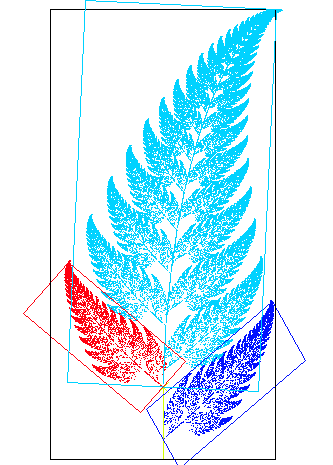
Matematika, sebagai salah satu cabang ilmu pengetahuan awalnya mempelajari fenomena ini sebagai benda-benda matematis. Geometri fraktal adalah cabang matematika yang mempelajari sifat-sifat dan perilaku fraktal. Fraktal bisa membantu menjelaskan banyak situasi yang sulit dideskripsikan menggunakan geometri klasik, dan sudah cukup banyak diaplikasikan dalam sains, teknologi, dan seni karya komputer. Dulu ide-ide konseptual fraktal muncul saat definisi-definisi tradisional geometri Euklides dan kalkulus gagal menganalisis objek-objek kurva monster tersebut.
 |
| Gambar Fraktal Fern |
Salah satu contoh fraktal adalah fractal fern atau fraktal daun. Gambar fraktal fern dapat dilihat diatas dan untuk menggambarnya dapat menggunakan script Matlab berikut ini. Silakan run script Matlab berikut dan ganti parameternya untuk mendapatkan gambar yang berbeda.
Tuesday, September 20, 2011
Instalasi Matlab di Ubuntu Linux
Sebagai salah satu program yang paling banyak digunakan dalam dunia saintifik, khususnya di bidang Teknik atau Engineering, mau tidak mau Matlab harus terinstall dalam setiap PC atau laptop mahasiswa teknik, termasuk pada PC atau laptop yang ber-OS Ubuntu / Linux. Nah, biasanya ada permasalahan saat instalasi Matlab di Ubuntu. Permasalahan itu tak lain dan tak bukan pada file permission.
Saya asumsikan anda telah memiliki instalasi Matlab untuk Linux atau Mac (Silakan "beli" atau cari trialnya di Google). Jika file instalasi berasal dari DVD (.iso),maka copy dulu file itu ke dalam laptop dan ekstrak untuk mendapatkan file instalasinya, klik kanan file .iso tersebut, pilih open with >> Archieve Mounter. Kemudian berpindahlah pada directory dimana file .iso tersebut di mount (mudahnya klik kanan "open in terminal" di directory tersebut). Jika anda hanya mengekstrak file ISO tersebut kemudian berpindah ke direktori hasil ekstraksi untuk menginstall Matlab (sesuai langkah dibawah) kemungkinan akan ada error dan instalasi tidak akan berhasil.
Setelah itu, ketik perintah berikut
maka ubah direktorinya dengan perintah
Pastikan juga anda memiliki file lisensi (license file) pada direktori tersebut yang biasanya bernama license.dat
Saya asumsikan anda telah memiliki instalasi Matlab untuk Linux atau Mac (Silakan "beli" atau cari trialnya di Google). Jika file instalasi berasal dari DVD (.iso),
Setelah itu, ketik perintah berikut
cd DIREKTORI_MATLAB_MU/update/bin/glnx86

sudo chmod 777 *

cd DIREKTORI_MATLAB_MU

sudo sh install
Misal, jika direktori master/installer matlab anda di home/user/matum2k9b
maka ubah direktorinya dengan perintah
cd /home/user/matum2k9b/bin/glnx86

sudo chmod 777 *

cd /home/user/matum2k9b

sudo sh install
Pastikan juga anda memiliki file lisensi (license file) pada direktori tersebut yang biasanya bernama license.dat
Friday, May 01, 2009
Pengolahan Sinyal Akustik
Ada beberapa cara untuk merekam dan menganalisa sinyal suara dengan software Matlab. Untuk perekaman, bisa melalui daq toolbox (data acquisition), perintah wavrecord serta audiorecorder. Semua teknik tersebut mensyaratkan adanya souncard yang telah terpasang, baik internal maupun eksternal.
Berikut proses perekaman dengan perintah wavrecord:
>> Fs=8000;   % deklarasi frekuensi sampling
>> y=wavrecord(5.0*Fs,Fs); % merekam suara selama lima detik
>> figure(1);
>> plot(y);    % menggambar bentuk gelombang
>> wavwrite(y,Fs,'aiueo.wav') % menyimpan file .wav
hasil perintah diatas adalah sebagai berikut:
 |
Gb.1 Waveform Sinyal Akustik
|
Gambar diatas adalah plot sinyal suara dalam domain waktu yang biasa disebut waveform. Pada Matlab, amplitudo sinyal akan dibatasi pada range [-1 1] dikarenakan ini adalah sinyal teganan yang dinormalisasi (encoding PCM) dan tidak bersatuan. Sedangkan pada sumbu-x grafik diatas adalah masih dalam sample point (jumlah sample) bukan dalam satuan detik. Untuk menjadikan sumbu-x menjadi detik, maka dapat kita definisikan variabel t sebagai berikut,
t = 1/Fs:1/Fs:length(y)/Fs;
plot(t,y)
Simple bukan..? Next analysis....
Analisis
Hampir semua analisa sinyal dilakukan dalam domain waktu dan frekuensi, karena itulah disebut time-frequency analysis. Dalam domain waktu, sinyal digambarkan dengan bentuk waveform dimana sumbu-x menunjukkan time dan sumbu-y menunjukkan besarnya amplitude tiap waktu. Bentuk ini kadang kurang informatif karena kita tidak bisa mengetahui besarnya magnitude tiap waktu. Untuk itu diperlukan sebuah transformasi yang mampu mengubah waveform menjadi spectrum, dimana tiap komponen frekuensi akan terlihat jelas. Nah, Fourier Transform merupakan tranformasi yang dapat melakukan hal ini. Apalagi ditambah dengan adanya FFT atau Fast Fourier Transform, maka waktu komputasi akan menjadi lebih cepat sehingga memudahkan analisa sinyal suara. Output dari FFT berupa spectrum yang menggambarkan grafik frekuensi dengan magnitudo.
Berikut cara mengubah waveform dari sinyal y hasil perekaman menjadi spectrum dengan teknik sekaligus perintah fft:
Subscribe to:
Posts (Atom)