Showing posts with label open source. Show all posts

Thursday, April 23, 2015

SPTK basic operation: .wav, .raw., .short

The Speech Signal Processing Toolkit (SPTK) is a suite of speech signal processing tools for UNIX environments, e.g., LPC analysis, PARCOR analysis, LSP analysis, PARCOR synthesis filter, LSP synthesis filter, vector quantization techniques, and other extended versions of them. It is developed by Prof. Imai and Prof. Kobayashi of Tokyo Inst. of Tech, and currently maintained by Nagoya Inst. of Tech. To install SPTK in Linux and Unix based-OS is easy, download the source file, extract and do the following,

./configure
make
sudo make install

That's all installation process, it will install SPTK in /usr/local/SPTK by default.

Add SPTK path to .bashrc

Now SPTK is installed in our machine, but by default it is (SPTK command) not searchable in our shell/terminal. To make it searchable (instead of use /usr/local/SPTK/bin/command everytime), we can add the path to .bashrc. Open .bashrc with editor (vim/gedit/other) and add the following,
export PATH=$PATH:/usr/local/SPTK/bin
And it's added to our command path, check it by using "impulse -h" in terminal. If done, it will show man pages of "impulse" command.

Remove Header : Convert Wav to Raw

SPTK provide utilities to remove header file in sound recording process by converting wav files to raw files (and we can convert it back to wav file). Here is how,
wav2raw +s data.wav
In current directory, there will be new file data.raw with header file removed. Argumen +s is for short data type, you can check full argument by wav2raw -h. To convert back in wav, use "raw2wav" command.

Convert to Short

To convert data from raw, wav or other format to .short (because mainly processing in SPTK is in .short format) we use command "x2x",

x2x +s data.raw > data.short 
It will covert raw to short, you can try to change other format.

Plot Waveform


Plot waveform in SPTK

Monday, April 13, 2015

How-to: Measure Impulse Response with Aliki

Aliki is software to measure room impulse response. It's free and open source. On a dynamic system, impulse response is its output(response) when presented with a brief input signal (impulse). For room acoustic, impulse response can be used to measure acoustic characteristics like reverberation time, early decay time, later decay time and speech intelligibility.

How to measure room impulse response? Here is how, with a software called Aliki (free and open source).

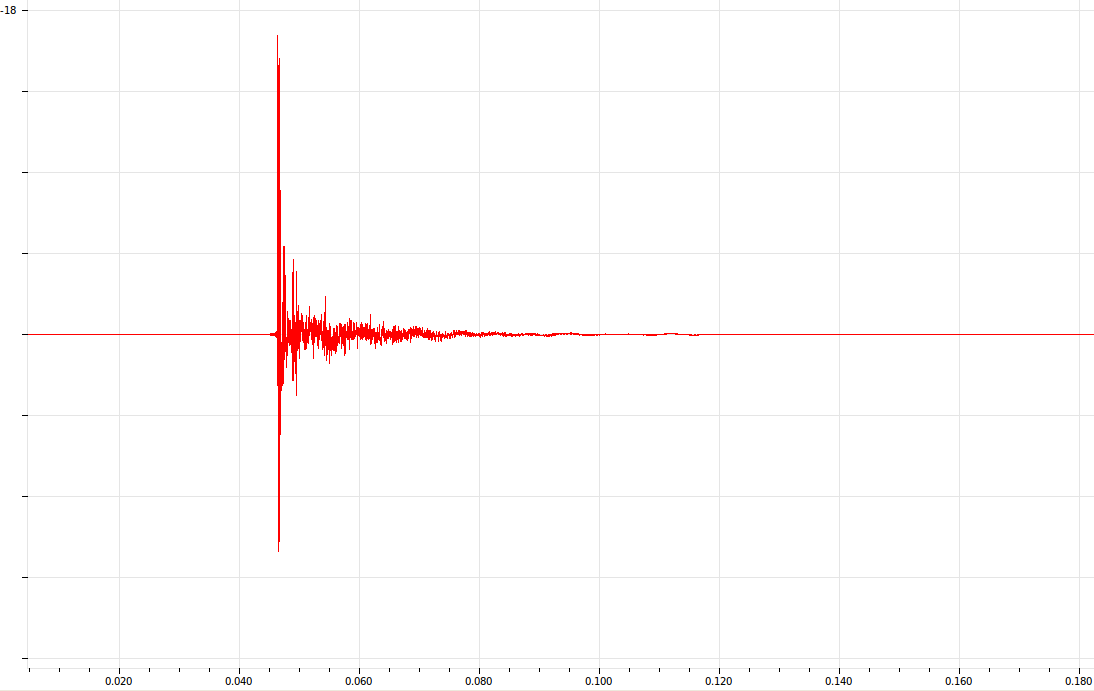
Impulse response of semi-anechoic room in VibrasticLab

Installation

In Ubuntu, it is easy to install Aliki using apt-get:
sudo apt-get install aliki
It will install Aliki (gui) and its dependencies.

Step-by-step :

Tuesday, September 06, 2011

20 Tahun Linux OS : Menuju Kebebasan ber-OS

Dua puluh tahun yang lalu, 5 Oktober 1991, seorang mahasiswa sarjana (undergraduate) di University of Helsinki, Finlandia, mengumumkan sebuah karyanya. Karya tersebut tidak untuk diikutkan lomba atau sejenisnya, namun murni ingin mendapat apresiasi dan masukan dari orang-orang yang mencobanya. Dia mengumumkan di sebuah newsgroup bahwa dia telah berhasil menciptakan sebuah sistem operasi sederhana yang dikembangkan dari UNIX. Di newsgroup tersebut, dia menulis seperti ini: “Hai kalian di sana para pengguna minix – saya membuat sistem operasi bebas (hanya untuk hobi, tidak sebesar dan se-profesional GNU)…” Email tersebut disambut antusias oleh berbagai banyak orang di dunia, terlebih Linus menyertakan kode sumbernya (source code) sehingga dapat dimodifikasi dan dihasilkan sistem operasi baru ala pembuat kodenya.


Penemuan Linus tersebut melengkapi upaya RMS (Richard M. Stallman) yang sejak tahun 1983 memulai proyek GNU di MIT (Massachusetts Institute of Technology) dan selama kurun waktu itu pula, mentok dalam pembuatan kernel. Kernel yang merupakan inti dari sebuah sistem operasi, penghubung hardware dan software komputer, merupakan permasalahan terakhir dari proyek GNU. Kernel Linux yang kemudian dilisensikan GPL (General Public License), mensyaratkan semua program turunannya juga berlisensi GPL. Sejak itulah, bermunculan sistem operasi GNU/Linux seperti Slackware, Debian, Redhat, dan sang fenomenal: Ubuntu.

Related Posts Plugin for WordPress, Blogger...