Wednesday, November 30, 2011

On Performance of Two-Sensor Sound Separation Methods Including Binaural Processors

Human beings have binaural inputs to separate and localize sound sources. Those two functions of binaural hearing can not be easily transformed to the computational methods. In this paper, three conventional methods to separate target signal from interfering noise are compared. Those methods include a binaural model, an independent component analysis (ICA) and a time-frequency masking applied to ICA. Performances were compared by means of spectrograms as well as coherence.

Above is abstract of my paper presented in ASJ Kyushu Chapter, November 25, 2011, in Oita - Japan. You can see the poster below (click to enlarge).

Full paper is available by request.

Solve Save Figure Problem On Octave (Ubuntu and Mac)

When I use the "print" command on GNU Octave to save figure/plot I got the following error. The errors were occurred in both Ubuntu 11.10 and Mac OS X.

Warning: query
error: value on right hand side of assignment is undefined
error: `tmp' undefined near line 57 column 11
error: evaluating argument list element number 1
error: called from:
error:   /usr/share/octave/3.2.4/m/strings/cstrcat.m at line 57, column 2
error:   /usr/share/octave/3.2.4/m/plot/print.m at line 707, column 7
The, I ask my friend and he give me the solution. The solution is to comment two lines in cstrcat.m according to the error.
sudo nano /usr/share/octave/3.2.4/m/strings/cstrcat.m
 Find the following line,

Wednesday, November 16, 2011

Solving Zekr Problem in Ubuntu 11.10 Oneiric Ocelot

An upgrading Ubuntu from 11.04 Natty to 11.10 Oneiric Ocelot remains a problem on Zekr launching. Zekr is Quranic study tool, it is available in www.zekr.org. When I update my Ubuntu 11.04 to 11.10, I got the following problem;

        at org.eclipse.swt.SWT.error(SWT.java:4308)
        at org.eclipse.swt.browser.Mozilla.create(Mozilla.java:683)
        at org.eclipse.swt.browser.Browser.(Browser.java:96)
        at net.sf.zekr.ui.QuranForm.makeFrame(QuranForm.java:475)
        at net.sf.zekr.ui.QuranForm.init(QuranForm.java:300)
        at net.sf.zekr.ui.QuranForm.(QuranForm.java:278)
        at net.sf.zekr.ZekrMain.startZekr(ZekrMain.java:51)
        at net.sf.zekr.ZekrMain.main(ZekrMain.java:91) 


Then, I search how to solve this problem and find a solution of this problem. The problem can be solved by editing file ~/.zekr/config/config.properties.

Just type in the terminal
sudo nano ~/.zekr/config/config.properties
and find the following,
options.browser.useMozilla = true
Then, change to:
options.browser.useMozilla = false
Let's try, it works for me!

Monday, November 14, 2011

Find Local Peak of Signal in GNU Octave

The finding or searching the local peak is needed for some application such as fundamental frequency estimation, finding time delay or timelag or others. The following is a simple program to find the local peak of signal. The example of .wav sound signal

octave:1> [signal, fs] =wavread('signal.wav');    % read signal

octave:2> threshold=0.1;                          % limit the min. peak amplitude

octave for sig_ind = 1:4000
> if signal(sig_ind) > threshold
> x=sig_ind;
> break;
> endif
> endfor
octave:3> x
x = 3822

To give the display and find the rough peak of signal you can see from the figures of signal. The picture below comparing whole signal and the local signal from 1 to 4000 samples. To find the coordinate of local peak, just simply type

[a b]=max(signal(1:4000)

Full length signal and signal from 1 to 4000 samples

Tuesday, November 08, 2011

Enable SSH File Sharing in Mac OS X


Sometimes, we need to communicate or transfer data among our laptops/PCs. Instead of using storage media such as removable disk, the use of network connection is better and faster. This article will briefly explain, how to share your file in Mac OS to other PCs like Ubuntu Linux and Windows. Let's start.
The Apple Mac OS X has SSH by default has installed. Nevertheless, the SSH daemon is not enabled by default. It means you can not login remotely or do remote copies from another PC until you enable the SSH.
So, to enable SSH, just go to System Preferences in your Mac. Under Internet & Networking there is a Sharing icon. Please, click that icon. In the list appears on screen you can check the Remote Login and File Sharing option.
Sharing Menu on Mac OS X
This steps begins the SSH daemon immediately. Now, you can remotely login using your username and password. The Sharing screen at the bottom shows the name and IP address to use. You can also find this out using whoami and ifconfig from the Mac Unix Terminal.

Now, you can access your Mac from another PC. Just, install the required program in another PC such as openssh. In ubuntu, you can use the following commant (in terminal) to install openssh.

sudo apt-get install openssh
That enables ubuntu to access your Mac from terminal or nautilus file management.

Monday, November 07, 2011

Play Sound/Audio File such as .wav in GNU / Octave

In octave, there is not function like wavplay or sound such in Matlab. Octave has own function to play audiofile i.e playaudio, but it is never work for me. Instead of repair the playaudio function in Octave, below is simple script function to play sound file in Octave.

Please copy the code below and paste to your PC (work on Ubuntu Linux) as playsound.m

%%%%%%%%%%%%%%%%%%%%%%%%%%%%%%%%%%%%%%%%%%%% 
% This function play the singal x as a sound.
% playsound(x, fs, bits)
%  x : a signal vector
%  fs: sampling frequency in Hz
%  bits: quantization bits
%
% If encounter a error, try to transpose a signal vector,
% like playsound(x',fs,bits)

function playsound(x,fs,bits)
if (nargin != 3)
  usage("playsound(x,fs,bits)");
endif

 file= strcat(tmpnam(),".wav");
 wavwrite(file,x,fs,bits); 
 system(sprintf("/usr/bin/paplay %s ; rm -f %s",file,file));
endfunction
%%%%%%%%%%%%%%%%%%%%%%%%%%%%%%%%%%%%%%%%%%%%%

Calculate Time Lag from Cross-correlation in Octave - Matlab

Calculation of time lag or time delay between two identical signal is very important in many areas, especially in system identification. By knowing time delay or time lag, we can analysis the signal such as subtract the output signal length according to the time lag. This problem usually appears in signal processing, control system, process, acoustic (determine time lag between sound sources and microphone) or other systems with input and output data.

In the other side, cross-corelation is useful tools. Using cross-correlation we can find the strongest point of correlation between two signal, and then shift the signal according to distance of strongest point to zero position. But the problem is the x-axis in cross-correlation not the time or sampled time (length), it is index. Let's solve by bringing the problem to computation methods such as GNU/Octave or Matlab.

Suppose, we have two signal in case of signal enhancement process. The first signal is true target signal, and the second is enhanced signal. We want to know, the time lag between true target signal and enhanced signal. The time lag can be resulted because of algorithm processing and others.

First, we read sound data in Octave or Matlab. We type,

[signal, fs]=wavread('signal.wav');

[enhance,fs]=wavread('enhance.wav');

And then, calculate the cross-correlation between signal and enhanced signal using the following command, 

Enable Japanese Language Keyboard Input in Ubuntu

The latest and newest Ubuntu such as Oneiric Ocelot version makes setting and tweaking the OS simple. One of the simple way offered by Ubuntu OS is its customization to your language both as display window and keyboard input. This article will review step-by-step to make Japanese characters: Kanji, Hiragana and Katakana are enabled in your Ubuntu. So, you can write in Kanji or Hiragana to your friends via email, chat and other.

First, open the dash home (in Unity) and type : Language. What you need is both Language Support Option and Keyboard Input. Please see figure below, to have more detail.

In the Language Support, press the Install / Remove Languages… button.

In the Installed Languages screen, scroll down to Japanese and check Input methods and Extra fonts, and press Apply Changes.

Wednesday, November 02, 2011

Life is competition, Let's do the best to be the winner..

That is my favorite words, my goal in my life, to do the best, even be the winner...


Because we live in a very competitive world. Everybody seems to be competing with someone at some level. Each week we spend hours playing or watching others compete in sporting activities all over the world. We cannot help being impressed by the level of excellence that these people achieve.

In all aspect, for example in sport and business, competition encourages excellence in performance. Where there is no competition, improvement in performance is less likely. We have lived through an era where governments have held monopolies in business. With no competition from free enterprise, services deteriorate. Monopolies create sloppy business practices, less innovation and higher prices. Business performs better with competition. Costs and prices decrease. Some level of competition is necessary in all aspects of life.


We are not in competition with any other person

The God creates us different each other. But, every one has the same chance to be success in his or her world. So we do not have to compare ourselves with others. We do not have to become discouraged because we think that someone else is better than we are in a particular area. The essence of our being is equal to that of any other person.There is only one person that can fulfill our role and that is us. This means that others cannot beat us to the finish line because there is no race. This is not to say that others do not have a similar role to us, but it is never the same. This is important to understand if we are going to enjoy life. Every human being is unique and cannot be duplicated. In this, I am not referring to the body, only to the spirit, soul, or the essence of a person.

Tuesday, November 01, 2011

Autologin Ubuntu 2d on Oneiric Ocelot

The new Ubuntu 11.10 Oneiric Ocelot used Unity or Ubuntu 3D as default windows manager. For low-powered computer or laptop, it will be run slowly. The alternative is change the default Ubuntu Unity 3d (in the login screen it is called "ubuntu" only) windows manager to ubuntu-2d. But, each login you must set this setting. Just try this method to make ubuntu-2d be default your windows manager,

in the file /etc/lightdm/lightdm.conf you have to change the user-session to ubuntu-2d. In ther terminal, just type,
sudo nano /etc/lightdm/lightdm.conf
and fill the blank user-session to ubuntu-2 like this,
user-session=ubuntu-2d

and leave other options as default. Just for your information, The ubuntu-2d is implemented using Qt/QML for the UI portions of Unity, while utilizing the existing Unity core components, like indicators, bamf, dee, uTouch and places.

This screenshot show you the lightdm.conf in which you must change the setting of user-session as I mentioned above.
Screenshot of lightdm.conf

Pemisahan Banyak Sumber Suara Mesin Menggunakan Analisis Komponen Independen (ICA) Untuk Deteksi Kerusakan

Pemeliharaan kondisi mesin di industri membutuhkan kecepatan dan kemudahan, salah satu metodenya adalah dengan analisis getaran. Getaran mesin menyebabkan pola suara yang diemisikan mesin, di mana suara mesin satu bercampur dengan mesin lainnya. Blind Source Separation (BSS) merupakan teknik memisahkan sinyal campuran berdasarkan sifat kebebasan statistik antar sumber. Melalui simulasi dengan beberapa motor dan susunan mikrofon sebagai sensor didapatkan data suara campuran dari beberapa motor yang terekam melalui tiap mikrofon, di mana intensitas sinyal yang diterima mikrofon berbeda satu sama lain, tergantung pada jarak dan sudut datangnya. Tujuan penelitian ini adalah untuk memisahkan sinyal campuran dari tiap mikrofon sehingga didapatkan sinyal estimasi sumber untuk mendeteksi kerusakan motor. Berdasarkan hasil penelitian diperoleh pemisahan sinyal terbaik dalam Time-Domain ICA. Sinyal estimasi tersebut dianalisis untuk menentukan kondisi kerusakan mesin berdasarkan pola frekuensi sesaatnya. 

Full paper bisa di download disini, it's free. 
(Jurnal Ilmu Komputer dan Informasi, Fasilkom - UI, Februari 2011)
Pengantar tentang Blind Source Separation bisa dibaca disini.

Monday, October 31, 2011

Machinery fault diagnosis using independent component analysis (ICA) and Instantaneous Frequency (IF)

Machine condition monitoring plays an important role in industry to ensure the continuity of the process. This work presents a simple and yet, fast approach to detect simultaneous machinery faults using sound mixture emitted by machines. We developed a microphone array as the sensor. By exploiting the independency of each individual signal, we estimated the mixture of the signals and compared time-domain independent component analysis (TDICA), frequency-domain independent component analysis (FDICA) and Multi-stage ICA. In this research, four fault conditions commonly occurred in industry were evaluated, namely normal (as baseline), unbalance, misalignment and bearing fault. The results showed that the best separation process by SNR criterion was time-domain ICA. At the final stage, the separated signal was analyzed using Instantaneous Frequency technique to determine the exact location of the frequency at the specific time better than spectrogram. 

Full paper is available in IEEExplore

Tuesday, October 25, 2011

High-Quality Resample (Downsample/Upsample) Sound File (.wav)

In this occasion let me show how to resample (Downsample/Upsample) sound file such as .wav in high-quality format directly on your Operating System.

The software/program that I used is libsamplerate (SRC). You can download here. Follow the instruction and the "README" text, and install it manually (if you used Unix-based OS, I think it just a simple job:) ). How to use it ? Just choose one of two options below,
sndfile-resample -to  newsamplereate [-c number] inputfile.ext outputfile.ext

sndfile-resample -by  amount [-c number] inputfile.ext outputfile.ext
The optional -c argument allows the converter type to be chosen from the following list :  
  • 0 : Best Sinc Interpolator
  • 1 : Medium Sinc Interpolator (default)
  • 2 : Fastest Sinc Interpolator
  • 3 : ZOH Interpolator
  • 4 : Linear Interpolator

For example, I resampled my input file namely female02_44k.wav which has 44100 Hz of sampling rate to be 8000 Hz with output name is female.wav. So, I use the following command,
sndfile-resample -to 8000 female02_44.wav female.wav
After that, I will get the result as the following,
Resample Result Using libsamplerete
So, what is libsamplerate?

Saturday, October 22, 2011

The Forgotten Contribution of Medieval Physicists

We learn at school that Newton is the father of modern optics, Copernicus heralded the birth of astronomy, and Snell deduced the law of refraction. But what debt do these men owe to the physicists and astronomers of the medieval Islamic Empire? What about Ibn al-Haytham, the greatest physicist in the 2000-year span between Archimedes and Newton, whose Book of Optics was just as influential as Newton’s seven centuries later? Or Ibn Sahl, who came up with the correct law of refraction many centuries before Snell? What of the astronomers al-Tusi and Ibn al-Shatir, without whom Copernicus would not have been able to formulate his heliocentric model of the solar system?

Is that all true? Come in to this lecture in the link below, Jim Al-Khalili recounts the stories of these characters and more from his new book Pathfinders: The Golden Age of Arabic Science.

Please follow the link below,

Tuesday, October 18, 2011

Generating White Noise Sound on Octave / Matlab


The following white noise sound was generated with GNU Octave's random number generator rand(), which generates uniformly distributed random values in the interval [0,1). The wavwrite() function expects values in [-1.0, 1.0), so we multiply by 2 and shift down by 1. So to generate 10 seconds of noise sampled at 48 kHz:
white=rand(48000*10,1)*2-1;
I'm not sure about the inner workings of /dev/urandom, but I used the "reseed" command to feed it data from random.org, so this should be pretty random. To export this to a 16-bit, 48 kHz .wav file in our home directory, the command is:

When the Eigenvectors of Matrix Always Orthogonal or Not (With Octave/Matlab Prove)

In Linear Algebra, an orthogonal matrix is defined as matrix with its transpose equal to its inverse,
$$ Q^T = Q^{-1}$$ or
$$ Q.Q^T = Q^T.Q = I $$ How about eigenvectors of Matrix? Are eigenvectors always orthogonal? The short answer is no. Eigenvectors of an arbitrary (but not degenerate) square real matrix A are sure to be independent (if there are no repeated eigenvalues), however they are not necessarily orthogonal.

Are eigenvectors of a symmetric matrix always orthogonal? The short answer is yes. Gilbert Strang gives the following definition: A real matrix has perpendicular eigenvectors if and only if $A^{T}A=AA^{T}$.

It follows that eigenvectors of a symmetric real matrix A (i.e $A =A^T$) are perpendicular. Another nice property of symmetric matrices is that their eigenvalues are real.

Let`s check using Octave/Matlab,

Monday, October 17, 2011

Sites in Kumamoto Castle

Before read this story, it's better to read my visit to Kumamoto Castle. Then, continue read the story below about some interesting sites in Kumamoto Castle.

The Main Towers
The area around the main towers and the Hon-maru Goten was destroyed by fire three days before the Seinan Rebellion began. The cause of the fire remains unknown. The present main tower were rebuilt in 1960 to restore the castle's exterior. The larger main tower has 6 stories with a basement and about 30 meters above the stone fence, and the smaller main tower has 4 stories with a basement and about 19 meters in height.
Exhibition and historical relics of the two ruling feudal clans, Kato's and Hosokawa's as well as the Seinan Rebellion are housed in the tower buildings.
Kumamoto Castle Main Tower
Uto-Yagura

The Walking Tour of Suizenji Park

This is is my third trip in Kumamoto City, Japan. After visiting the Castle and Zoological and botanical garden, the story is continuing..

This is Suizenji Park.
The Suizenji Park View

Suizenji is famous park in Kumamoto city Japan. Besides the Kumamoto castle, zoo, botanical garden and other, Suizenji Park is another interesting tour destination in Kumamoto. The park was built to dedicate to the Hosokawa heritage. The duke Hosokawa is author in Kumamoto after the Kato's clan. He lived in Kumamoto castle and continued by his family to maintain feudal domain system in Kumamoto at the era.
The Suizenji Park, Kumamoto, Japan
The walking tour of Suizenji jojuen takes about 20 minutes.

Saturday, October 15, 2011

Penuaan, bisakah dicegah?

Penuaan merupakan proses biologis disebabkan karena sel-sel hidup sudah tidak ada lagi, dan dapat mengakibatkan sel-sel tersebut tidak berfungsi secara optimal akibat penumpukan unsur-unsur yang hilang. Hal ini akan mengakibatkan kematian karena sulit menghilangkan pengaruh unsur-unsur ini, akan tetapi bisa menghindari kemungkinan negatif pada sel di saat tua melalui pengaktifan sel untuk membersihkan sel-sel dari unsur-unsur yang merugikan tatkala pembentukan awal, juga guna menjaga stabilitas akfitas sel.

Seperti judul artikel ini, bisakah kita mencegah penuaan? Mari kita tinjau dari sisi sains dan Islam.

Friday, October 14, 2011

Jalur Pendakian Gunung Kerinci

After all equipments are already packed.

Mulai dari carrier sampai jas hujan. Dari kompor masak, sleeping bag, peralatan logistik dan lain-lain. Yang di list udah masuk. Tinggal berangkat aja. Let's go!

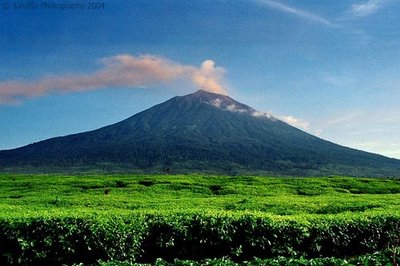
Gunung Kerinci
Gunung Kerinci merupakan gunung berapi yang tertinggi di Indonesia dengan ketinggian 3800m dpl dan masih dalam keadaan aktif. Berada pada lintang 10°45,50' LS dan 1010°160' BT. Terletak di dua kabupaten yaitu Kerinci dan Sulak Deras. Dikaki gunung ini juga anda bisa temukan perkebunan teh yang terdapat di desa Kersik Tuo. Didesa Kersik Tuo ini banyak terdapat penginapan-penginapan yang diusahakan oleh penduduk setempat. Penduduk didesa Kersik Tuo ini mayoritas adalah suku Jawa yang sudah lama sekali tinggal disana, sejak jaman kolonial Belanda. Gunung kerinci berada dibawah perlindungan Taman Nasional Kerinci Semblat.

Beberapa rute untuk mencapai G. Kerinci
Gunung Kerinci bisa dicapai lewat kota Jambi atau kota Padang atau juga dari Muara Bungo. Muara Bungo terletak di jalan Lintas Sumatera antara profinsi Jambi dan Sumatera Barat. Keterangan rute-rute tersebut sebagai berikut.

Rute Kota Padang Sumatera Barat.
Padang - Kersik Tuo - Sugai Penuh.
Naik bus umum trayek Padang Sungai Penuh dan turun didesa Kersik Tuo.

Rute dari Jambi.
Jakarta - Jambi - Sungai Penuh - Kersik Tuo.

Rute dari Muara Bungo.
Jakarta - Muara Bungo - Sungai Penuh.

Dari Jakarta naik bus tujuan Padang, dan turun di kota Muara Bungo, dari sini dilanjutkan perjalan dengan menumpang mini bus dengan tujuan Sungai Penuh. Kemudian ganti kendaraan lagi dengan naik angkutan mini bus ke desa Kersik Tuo. Selain dari Kersik Tuo bisa juga dicapai dari Lubuk Gadang dan Kayu Aro. Akan tetapi rute dari desa Kersik Tuo adalah yang umum dipakai oleh para pendaki. High-camp.com menyarankan anda menginap dulu di Kersik Tuo dan memulai pendakian pagi keesokan harinya.

Mengawali perjalanan dari sungai Penuh kami langsung menuju Pintu Rimba untuk memasuki kawasan Gunung Kerinci. Setelah menyantap makan siang nasi bungkus Dendeng Betokok kami siap-siap berangkat. Namun hujan mulai turun. Aku bertanya apakah pendakian ditunda? Tidak jawab guide kami. Pendakian harus dimulai karena waktu berjalan terus. Kami semua mengeluarkan jas hujan. itulah gunanya membawa barang tersebut.

Setelah semuanya siap, tepat pukul 16.30 WIB mulai mendaki.

TAHAPAN RUTE PENDAKIAN